
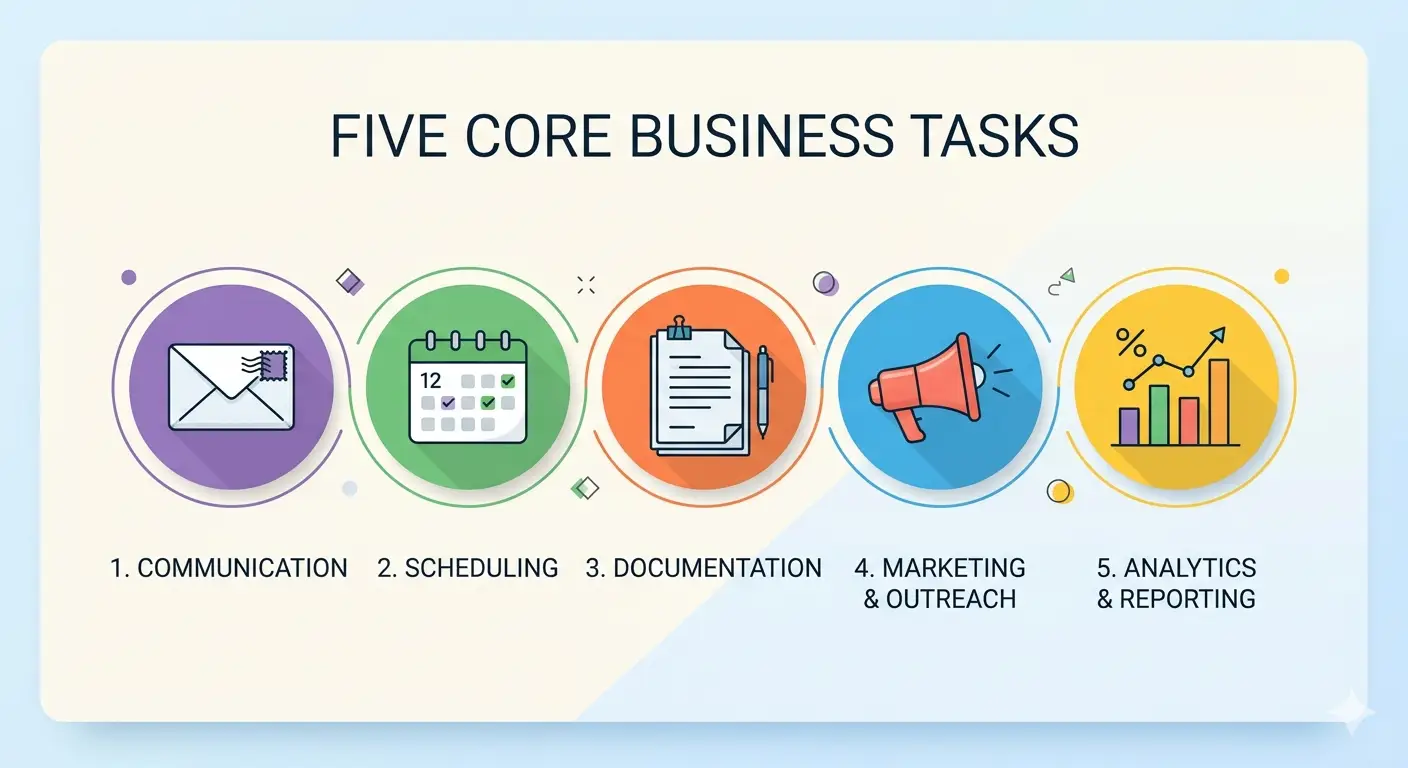
The conversation around AI in business has a habit of staying frustratingly abstract — full of potential and short on specifics. So rather than another overview of what AI could theoretically do, this post is different. These are five concrete business tasks that small businesses are automating right now, using tools that exist today, at costs that make sense for businesses that aren’t enterprises. For each one, you’ll find what it involves, how it works in practice, what it costs, and where to start.
If you’ve read our guide to AI workflow automation, you’ll know the distinction between using AI tools and building AI systems. This post is about the latter — specific workflows where AI runs in the background, handling defined tasks automatically, so you and your team can focus on the work that actually needs a human.
Each of the five tasks below meets the same criteria: high repetition, well-defined process, significant time cost, and low risk when the AI gets something slightly wrong. These are the characteristics that make a task worth automating first.
Task 1: Customer Enquiry Response and Routing
The problem: Enquiries arrive by email, contact form, live chat, and sometimes social media DM — often outside business hours, always requiring a prompt response. The average small business takes 47 hours to respond to a web enquiry. Studies show that response within five minutes increases the likelihood of converting that lead by more than 20 times compared to a response an hour later.
What AI automates: An AI system reads the incoming enquiry, identifies the type of request (new client, existing client, supplier, media, other), drafts a personalised initial response in your brand voice, and either sends it automatically or presents it for one-click approval. For straightforward enquiries — pricing questions, service queries, booking requests — the AI can handle the full response. For complex or sensitive enquiries, it routes to the right person with context already summarised.
Real example: A Wolverhampton-based consultancy receives 15–20 enquiries per week. Previously, the owner spent 45–60 minutes daily on initial email responses. After implementing an AI enquiry system, automated responses go out within minutes for 80% of enquiries. The owner reviews and approves the remaining 20% in under 10 minutes each morning. Total time saved: approximately four hours per week.
Tools: Make (formerly Integromat), Zapier with AI steps, or a custom build using the OpenAI or Anthropic API connected to your email and CRM.
Starting cost: £50–£150/month for a no-code setup. £800–£2,500 for a custom build with your specific workflows and brand voice trained in.
Task 2: Appointment Scheduling and Follow-Up
The problem: The back-and-forth involved in scheduling a meeting is one of the most disproportionately time-consuming tasks in a service business. Research suggests the average professional spends 4.8 hours per week on scheduling-related communication. Multiply that across a small team and the waste is significant — for a task that adds no value to either party.
What AI automates: When a prospect or client requests a meeting, an AI agent reads the request, checks your live calendar availability, proposes appropriate times based on your preferences and buffers, confirms the booking, sends calendar invites to both parties, issues automated reminders at 24 hours and 1 hour before, and updates your CRM with the meeting details. No human involvement required until the meeting itself.
Post-meeting automation: After the call, an AI tool can transcribe the recording, identify action items and decisions, draft a follow-up email summarising next steps, and create tasks in your project management tool — all within minutes of hanging up.
Real example: A web design agency reduced the average time between first contact and booked discovery call from 3.2 days to 4 hours, simply by automating the scheduling loop. Response speed became a competitive differentiator — prospects commented on how quickly and smoothly the booking process felt.
Tools: Calendly (for the scheduling layer) combined with Zapier or Make for CRM updates and follow-up triggers. Otter.ai or Fireflies.ai for post-meeting transcription and action item extraction.
Starting cost: £30–£80/month for a tool-based setup. Meeting transcription and summarisation tools add £15–£40/month.
Task 3: Invoice Processing and Data Entry
The problem: Every invoice that arrives in your inbox requires the same sequence of manual steps: open it, read it, extract the supplier name, date, amount, and line items, enter that data into your accounting software, code it to the right category, and file it. For a business receiving 30–50 invoices per month, this is two to four hours of pure data entry — work that creates no value and is error-prone precisely because it’s tedious.
What AI automates: An AI document processing system monitors a dedicated email address or folder, detects incoming invoices, reads them using optical character recognition combined with AI interpretation (handling varied formats, layouts, and languages), extracts all relevant data fields, and pushes them into your accounting software — QuickBooks, Xero, FreeAgent, or similar — with the appropriate expense codes pre-applied based on the supplier.
Exceptions — invoices it’s uncertain about, duplicates, or amounts above a defined threshold — are flagged for human review rather than processed automatically.
Real example: A 12-person professional services firm was spending approximately six hours per week across two team members on invoice processing. After implementing an AI document processing workflow, 85% of invoices are processed automatically with no human involvement. The remaining 15% take an average of two minutes each to review and approve. Total time saved: approximately five hours per week. Error rate dropped from 3% to under 0.5%.
Tools: Dext (formerly Receipt Bank), AutoEntry, or a custom build using document AI APIs from Google Cloud or AWS connected to your accounting platform.
Starting cost: £25–£80/month for established invoice processing tools. Custom integrations: £600–£2,000 depending on complexity.
Task 4: Content Repurposing and Social Distribution
The problem: Creating a high-quality blog post takes time — research, writing, editing, formatting. But once it’s published, the content that took three to four hours to produce is often left to sit on the website and accumulate traffic slowly, with no active distribution. Meanwhile, posting consistently on LinkedIn, email newsletters, and other channels requires a constant stream of fresh input that most small businesses simply don’t have the capacity to produce from scratch.
What AI automates: When a new blog post is published, an AI system reads the content, identifies the core argument, key takeaways, and quotable moments, and automatically produces: three LinkedIn post variations (different angles and formats), an email newsletter summary, a short-form Twitter/X thread, and a set of social captions for Instagram or Facebook. Each output is in the appropriate format for the channel and in the brand’s voice.
A human reviews and selects from the options rather than writing from scratch — reducing the time investment from 2–3 hours of original writing to 15–20 minutes of review and approval.
Real example: HusQuay’s own content workflow. Each blog post produces six LinkedIn posts (three per profile), an email snippet, and supporting social content — all generated from the original article. The manual writing time for supporting content has been reduced by approximately 80%.
Tools: Zapier with OpenAI or Anthropic API steps, or dedicated tools like Jasper, Copy.ai, or Buffer’s AI features for social content. Custom workflows built on n8n for more flexibility.
Starting cost: £40–£120/month for tool-based setups. Custom builds: £800–£2,000.
Task 5: Weekly Reporting and Performance Summaries
The problem: Every Monday morning, someone in the business spends time pulling numbers from Google Analytics, the CRM, the accounting platform, the ads dashboard, and whatever other tools the business uses — compiling them into a report, calculating week-on-week changes, and writing a summary for the team or for themselves. It takes 1–3 hours. It adds no analysis. It just moves numbers from one place to another.
What AI automates: A scheduled AI workflow runs at the same time each week, connects to all relevant data sources via API, pulls the defined metrics, calculates changes and trends, and writes a plain-English summary identifying what went up, what went down, what’s worth attention, and what can be ignored. The report arrives in your inbox or Slack channel before you’ve sat down at your desk.
For businesses running paid advertising, an AI reporting layer can also flag anomalies — a sudden spike in cost per click, a drop in conversion rate, a campaign that’s outperforming — and recommend actions rather than just presenting numbers.
Real example: A digital marketing agency reduced Monday morning reporting from two hours across two team members to a 10-minute review of an AI-generated summary. The AI catches anomalies faster than manual review — particularly useful for client campaigns where early detection of problems matters.
Tools: Supermetrics or Funnel.io for data aggregation, connected to OpenAI for summarisation via Zapier or a custom build. Slack or email for delivery.
Starting cost: £60–£150/month for tool-based setups. Custom multi-source reporting builds: £1,500–£4,000.
Where to Start: Picking Your First Automation
The most common mistake businesses make with AI automation is trying to automate everything at once. The result is three half-built systems, none of which work properly, and a team that’s lost confidence in the whole approach.
Pick one task from the list above — ideally the one that takes the most time, happens most frequently, and follows the most consistent process. Map every step of that process out before touching any tools. Then build the simplest possible version first, test it thoroughly, measure the time saved, and only then expand.
The compounding effect of automation is real — but it requires patience at the start. One well-built automation that saves three hours per week is worth far more than five broken ones that save nothing.
Frequently Asked Questions
What business tasks can AI automate right now? The business tasks most commonly automated by small businesses right now include customer enquiry response and routing, appointment scheduling and follow-up, invoice and document processing, content repurposing across channels, and weekly reporting and performance summaries. These tasks share common characteristics — high repetition, well-defined processes, and significant time cost — that make them ideal for AI automation.
Do I need a developer to automate business tasks with AI? Not always. No-code tools like Zapier and Make allow non-technical business owners to connect apps and add AI steps to workflows without writing code. More complex automations — those involving custom integrations, specific brand voice training, or multi-step processes across several platforms — typically benefit from professional development. The investment usually pays back quickly in time saved.
How much does it cost to automate a business task with AI? Costs vary by complexity. Tool-based automations using platforms like Zapier, Make, or dedicated SaaS tools typically cost £30–£150/month. Custom-built automations using AI APIs cost £600–£3,000 to build, plus £50–£200/month for ongoing API and maintenance costs. Most automations pay for themselves within one to three months when the hourly cost of the manual work they replace is calculated.
How long does it take to set up an AI automation? Simple automations — a single trigger, an AI step, and an output — can be set up in a few hours using no-code tools. More complex workflows involving multiple apps, conditional logic, exception handling, and brand voice training typically take one to three weeks to design, build, and test properly. Rushing the setup phase is the most common cause of automations that create problems rather than solving them.
Is AI automation safe for sensitive business data? It depends on the tools and how they are configured. Reputable platforms have enterprise-grade security and comply with UK GDPR requirements. You should review the data processing agreements of any tool you use, particularly for workflows handling client personal data, financial information, or legally sensitive documents. A professional implementation will include appropriate data governance from the outset.
Which AI automation tool should a small business start with? For businesses with no existing automation, Zapier is the most accessible starting point — it connects the widest range of apps, has built-in AI steps, and requires no coding. Make (formerly Integromat) offers more flexibility for complex workflows at a similar price point. For businesses with specific or unusual requirements, a custom build using the OpenAI or Anthropic API gives the most control and performance.
Final Thought
Every hour your business spends on repetitive manual tasks is an hour not spent on the work only you can do. The five tasks above represent, for most small businesses, somewhere between five and fifteen hours of recoverable time per week — time that currently disappears into admin and could be redirected into client work, business development, or simply running a more sustainable operation.
The technology is accessible, the costs are reasonable, and the return is usually faster than expected. The only thing required is deciding which task to start with.
At HusQuay, we design and build AI automation systems for small businesses — from single-task automations to fully integrated operational pipelines. If you’re ready to find out what’s automatable in your business, let’s talk.
👉 Book a free automation audit with the HusQuay team
HusQuay is a digital growth agency helping small businesses across the UK, USA, Australia, and Canada build websites, brands, and digital systems that create measurable results. Based in Wolverhampton, UK.