
“We already use software for that.” It’s one of the most common responses when AI automation comes up in a business conversation — and it usually comes from a genuine place. Most businesses do already use software: a CRM, an accounting platform, a scheduling tool, maybe even Zapier. But there’s a fundamental difference between traditional rule-based software and AI-powered automation — and understanding that difference is the key to knowing what your business is actually missing, and what it stands to gain.
The Core Distinction
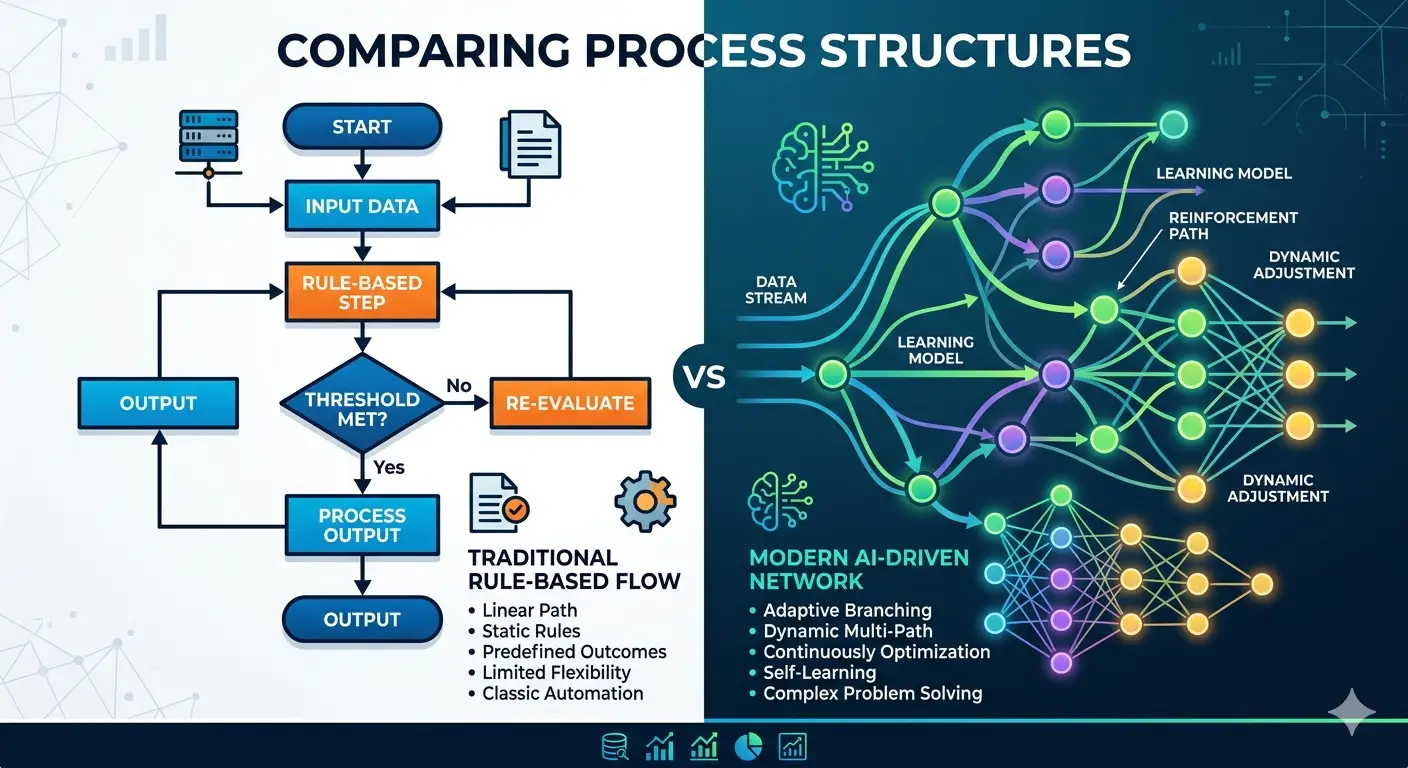
Traditional software follows rules. AI software learns from data and handles ambiguity.
That single sentence contains most of what you need to understand the difference — but unpacking it reveals why it matters so much in practice.
Traditional software operates on explicit, predetermined logic. A developer (or you, in a no-code tool) defines a set of rules: “if X happens, do Y.” The software executes those rules precisely and consistently, every time, for as long as the rules remain valid. It is deterministic — given the same input, it always produces the same output. It cannot handle situations outside the rules it was built for, and it has no ability to improve over time without someone manually updating the logic.
AI-powered software operates on learned patterns. Rather than following explicit rules, it processes large amounts of data, identifies patterns, builds models of how the world works, and uses those models to make predictions or decisions — including about inputs it has never seen before. It can handle ambiguity, read unstructured information like natural language, and in many cases improve its performance over time as it processes more data.
Neither is universally better. They are tools with different capabilities, suited to different problems.
What This Looks Like in Practice
The easiest way to understand the difference is through examples that map directly to business operations.
Email Management
Traditional software approach: An email filtering rule: “if the email contains the word ‘invoice,’ move it to the Finance folder. If it comes from @clientname.com, flag it as priority.” These rules work perfectly for the scenarios they were built for. An email containing “please send an invoice for the work you completed” goes straight to Finance — even though it’s a client request, not a supplier invoice. The rule doesn’t understand intent. It matches keywords.
AI-powered approach: An AI email management system reads the email, understands its purpose and context, identifies whether it’s an incoming invoice, a client query, a complaint, a sales enquiry, or something else — regardless of the specific words used. It drafts an appropriate response in your brand voice, routes it to the right person, and flags the genuinely urgent ones for immediate attention. It handles the same task across thousands of different email formats, phrasings, and contexts without a rule for each one.
Invoice Processing
Traditional software approach: An accounts payable rule: “if a PDF arrives from supplier@company.com, extract the amount from field position X and post to account code Y.” This works reliably for invoices from that specific supplier in that specific format. Change the supplier, change the template, receive an invoice in a different format, and the rule fails. Someone needs to handle it manually or a developer needs to write a new rule.
AI-powered approach: An AI document processing system reads any invoice — regardless of supplier, format, language, or layout — extracts the relevant fields (supplier name, invoice number, date, line items, total), understands what the purchase was for based on context, and suggests the appropriate account code. It handles thousands of different invoice formats without a specific rule for each one.
Customer Churn Prevention
Traditional software approach: A CRM automation: “if a customer has not logged in for 30 days, send a re-engagement email.” This rule fires for every customer who goes quiet for 30 days — whether they’re genuinely at risk, on holiday, or simply a low-usage but loyal long-term client. The rule treats all 30-day-inactive customers identically, regardless of their history, value, or behaviour pattern.
AI-powered approach: A predictive churn model analyses patterns across all customer behaviour — login frequency, feature usage, support ticket history, payment history, engagement with emails — and identifies which specific customers show patterns associated with churn, how urgent the risk is, and what type of intervention is most likely to work for each one. The right message goes to the right customer at the right time, based on their individual profile rather than a blanket rule.
The Seven Key Differences
| Traditional Software | AI-Powered Software | |
|---|---|---|
| Operates on | Explicit rules | Learned patterns |
| Input type | Structured, predictable | Structured or unstructured |
| Handles ambiguity | No — breaks or fails | Yes — adapts |
| Improves over time | Only if rules are updated | Can learn from new data |
| Requires data | Minimal — just defines rules | Substantial — to train effectively |
| Fails when | Input is outside the rules | Training data is poor or biased |
| Best for | Consistent, well-defined processes | Variable, context-dependent processes |
When Traditional Software Is the Right Choice
Traditional rule-based software is not inferior to AI — it’s the right tool for a different job. It is:
More reliable for well-defined processes. When a task always follows the same steps with predictable inputs, a rule-based approach is faster, cheaper, and more predictable than an AI system. Sending an automated order confirmation email, triggering a welcome sequence when someone joins a mailing list, moving a deal to the next CRM stage when a contract is signed — these are all tasks that traditional automation handles perfectly.
More transparent. You can see exactly why traditional software did what it did — it followed rule X. AI decisions are often harder to audit, which matters in regulated industries or situations where you need to explain a decision.
Cheaper to implement. Building rule-based automations with tools like Zapier or Make is typically faster and less expensive than deploying AI systems that require training data, model development, and ongoing monitoring.
More appropriate for small data environments. AI systems need data to learn from. For a business processing 20 invoices per month, an AI invoice system has limited data to learn from. A rule-based system for known suppliers is more practical.
When AI-Powered Software Adds Genuine Value
AI becomes genuinely valuable when the problem involves any of the following:
Unstructured inputs. Emails, documents, voice messages, images — any information that arrives in variable, non-standardised formats. Rules can’t parse these reliably. AI can.
Context and intent. Understanding what someone means, not just what they literally wrote. Customer sentiment, lead quality, complaint urgency, content relevance — these require interpretation rather than matching.
Pattern recognition at scale. Identifying which leads are most likely to convert, which clients are at risk of churning, which expenses are likely to be miscoded, which support tickets need escalation — tasks where the answer comes from patterns across large datasets, not from a rule any human could pre-define.
Adaptability. Markets change, customers change, language changes. AI systems can adapt to changing patterns over time. Rule-based systems require manual updates whenever the world changes.
How They Work Together
The most effective business technology stacks don’t choose between traditional and AI automation — they use both, in the right places.
Traditional software handles the well-defined, predictable backbone of operations: the CRM stage changes, the payment confirmations, the scheduled reports, the standardised workflows that run the same way every time.
AI handles the variable, context-dependent, high-judgment tasks that used to require a human: reading incoming communications, qualifying leads, processing documents, generating responses, identifying patterns in data.
The result is a system that is more robust than either approach alone — with traditional automation providing reliability and predictability where it’s needed, and AI providing adaptability and intelligence where rules alone fall short.
Does Your Business Actually Need AI Software?
The honest answer varies by business. A useful test is to look at your current manual workload and ask: how much of it involves processing information that arrives in variable, unpredictable formats? How much requires understanding context rather than matching patterns?
If most of your manual tasks involve consistent, predictable inputs following the same steps every time — start with traditional automation tools. Most of that work can be handled without AI.
If a significant portion of your manual workload involves reading and interpreting variable communications, processing documents from many different sources, or making judgement calls based on context — that’s where AI-powered automation adds value that traditional software genuinely cannot replicate.
For most small businesses, the answer is a mix: a foundation of traditional automation handling the predictable work, with AI layers handling the complex, variable tasks that previously required human judgement.
Frequently Asked Questions
What is the difference between AI automation and traditional software automation? Traditional software automation follows explicit rules — if X happens, do Y. It works reliably for consistent, predictable processes with structured inputs. AI automation learns from data and can handle variable, unstructured inputs — emails, documents, natural language — by understanding context and intent rather than matching keywords or patterns. The key difference is that traditional automation breaks when inputs fall outside its rules, while AI can adapt to inputs it has never encountered before.
Is Zapier AI automation or traditional automation? Zapier is primarily a traditional, rule-based automation platform — it connects apps and triggers actions based on conditions you define. It does now offer AI-powered steps within workflows (using AI to interpret or generate content within a Zap), which adds AI capability on top of a rule-based framework. A Zapier workflow that says “when a form is submitted, add to CRM” is traditional automation. A Zapier workflow that uses an AI step to read the form submission, assess its quality, draft a personalised response, and route it based on content is a hybrid approach.
Does AI automation replace CRM software? No — AI automation complements CRM software rather than replacing it. Your CRM stores and manages customer data. AI automation can enhance what your CRM does: qualifying leads before they enter the CRM, updating records automatically based on email and call activity, predicting which leads are most likely to convert, identifying at-risk clients, and generating personalised outreach at scale. The CRM remains the system of record; AI adds intelligence on top.
How much data does an AI automation system need to work effectively? It depends on what the system is doing. AI systems using pre-trained large language models (like those powering email drafting or document reading) can work effectively immediately, because the underlying model was trained on vast datasets before deployment. AI systems that need to learn patterns specific to your business — predicting your customers’ behaviour, identifying your specific churn signals — typically need several months of historical data to perform reliably.
Is AI software more expensive than traditional software? Not necessarily. Many AI-powered tools — AI features within existing platforms like HubSpot, Xero, or Microsoft 365 — are included in subscriptions businesses already pay for. AI API costs (for building custom AI automations) are typically measured in fractions of a penny per task. Custom AI automation builds are more expensive than equivalent rule-based builds — typically 30–60% more — but the complexity they handle often makes the investment worthwhile in time saved.
When should a small business not use AI automation? AI automation is not the right choice when: the process is simple, consistent, and well-defined (traditional automation is cheaper and more reliable); the data available is too limited to train an effective model; the stakes of an incorrect AI decision are high and hard to reverse; regulatory requirements demand full transparency and auditability of every decision; or the implementation cost exceeds the realistic value of the time saved.
Final Thought
The distinction between traditional software and AI automation is not about complexity for its own sake — it’s about matching the right tool to the problem. Rule-based systems are not outdated; they’re ideal for the right problems. AI systems are not magic; they require good data and clear use cases to deliver genuine value.
The businesses that get the most from technology are the ones that understand what each tool can and cannot do, and build their stack accordingly — using traditional automation where the process is predictable, and AI where the problem requires intelligence.
At HusQuay, we design automation systems for small businesses that combine both approaches — building reliable traditional workflows as the foundation and layering AI where it genuinely changes what’s possible. If you’re not sure what your business needs, that’s exactly the conversation to start with.
👉 Book a free automation consultation with the HusQuay team
HusQuay is a digital growth agency helping small businesses across the UK, USA, Australia, and Canada build websites, brands, and digital systems that create measurable results. Based in Wolverhampton, UK.